Quantum Molecular Computing Explained to a 5 Year Old

Despite all the underlying complexity… the fundamental rules are so strikingly intuitive that a five-year-old could grasp them without breaking a sweat.
Introduction
Intuition
Author

NicDeclic

Published

September 16, 2026

“Truth is not complex. It is our journey toward it that is.”
— Professor Alvin


Click to see library imports
import sys
if 'google.colab' in sys.modules:
    # 1. Download qmc.py from GitHub
    !wget -q https://raw.githubusercontent.com/nicdeclic/quantum-molecular-computing/main/qmc.py
    
    # 2. Download requirements.txt from GitHub
    !wget -q https://raw.githubusercontent.com/nicdeclic/quantum-molecular-computing/main/requirements.txt

    # 3. Install dependencies
    !pip install -q -r requirements.txt

sys.path.insert(0, "../../src") # Select root directory
from qmc import * # QMC library

%reload_ext autoreload
%autoreload 2

Young children possess a thinking process that is naturally fluid and intuitive, whereas adults often hold a more rigid worldview shaped by years of conventional, classical education.

Quantum computing operates through superpositions and probabilities — concepts that often feel deeply counterintuitive to a mind conditioned by binary logic.

Children, however, are entirely comfortable with a world where anything is possible, where something can simultaneously be “this” and “that,” much like a quantum state in superposition. In many ways, their cognitive style is far closer to the natural quantum fabric of reality.

That is why playful, hands-on experiences often provide the best entry point for truly grasping quantum computing — even for adults!

With nothing more than an ordinary pencil and a blank sheet of paper, we can intuitively understand how this all works without wrestling with difficult mathematics. All it takes is experimenting with and observing structures to see the mechanics reveal themselves.

Ready to play?


Game 1: The Dots and Lines Game

  • You can only draw dots, thin lines and thick lines.
  • Each dot can only be connected by 2 or 3 lines.
  • There can only be one thick line per dot.

Have fun finding a structure that follows these rules!

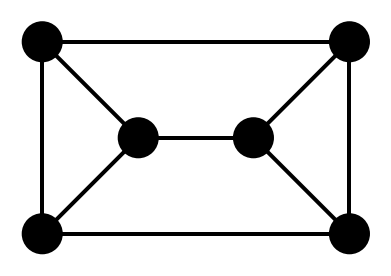
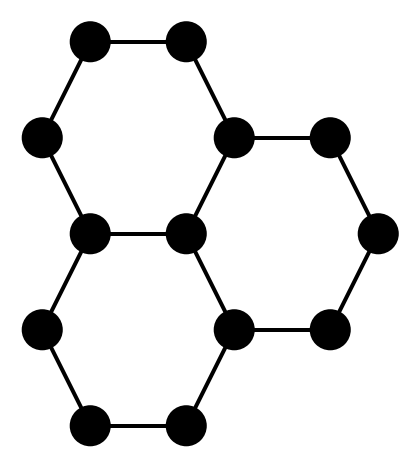
Start small. Here are a few suggestions :

Code
# Create a conjugated carbon molecule
mol1 = CarbonMolecule("Double Honeycomb")

# Add atoms
c1_1 = mol1.add_atom(x=-0.25, y=1)
c1_2 = mol1.add_atom(x=0.25, y=1)
c1_3 = mol1.add_atom(x=-0.5, y=0.5)
c1_4 = mol1.add_atom(x=0.5, y=0.5)
c1_5 = mol1.add_atom(x=-0.25, y=0)
c1_6 = mol1.add_atom(x=0.25, y=0)
c1_7 = mol1.add_atom(x=-0.5, y=-0.5)
c1_8 = mol1.add_atom(x=0.5, y=-0.5)
c1_9 = mol1.add_atom(x=-0.25, y=-1)
c1_10 = mol1.add_atom(x=0.25, y=-1)

# Add bonds
b1_1 = mol1.add_bond(c1_1, c1_2, order="single")
b1_2 = mol1.add_bond(c1_2, c1_4, order="single")
b1_3 = mol1.add_bond(c1_1, c1_3, order="single")
b1_4 = mol1.add_bond(c1_3, c1_5, order="single")
b1_5 = mol1.add_bond(c1_4, c1_6, order="single")
b1_6 = mol1.add_bond(c1_5, c1_6, order="single")
b1_7 = mol1.add_bond(c1_5, c1_7, order="single")
b1_8 = mol1.add_bond(c1_6, c1_8, order="single")
b1_9 = mol1.add_bond(c1_7, c1_9, order="single")
b1_10 = mol1.add_bond(c1_8, c1_10, order="single")
b1_11 = mol1.add_bond(c1_9, c1_10, order="single")

# Draw with Schemdraw
mol1.draw()


# Create a conjugated carbon molecule
mol2 = CarbonMolecule("Letter Envelope")

# Add atoms
c2_1 = mol2.add_atom(x=-0.8, y=0.5)
c2_2 = mol2.add_atom(x=0.8, y=0.5)
c2_3 = mol2.add_atom(x=-0.3, y=0)
c2_4 = mol2.add_atom(x=0.3, y=0)
c2_5 = mol2.add_atom(x=-0.8, y=-0.5)
c2_6 = mol2.add_atom(x=0.8, y=-0.5)

# Add bonds
b2_1 = mol2.add_bond(c2_1, c2_2, order="single")
b2_2 = mol2.add_bond(c2_1, c2_5, order="single")
b2_3 = mol2.add_bond(c2_2, c2_6, order="single")
b2_4 = mol2.add_bond(c2_1, c2_3, order="single")
b2_5 = mol2.add_bond(c2_2, c2_4, order="single")
b2_6 = mol2.add_bond(c2_3, c2_4, order="single")
b2_7 = mol2.add_bond(c2_3, c2_5, order="single")
b2_8 = mol2.add_bond(c2_4, c2_6, order="single")
b2_9 = mol2.add_bond(c2_5, c2_6, order="single")

# Draw with Schemdraw
mol2.draw()


# Create a conjugated carbon molecule
mol3 = CarbonMolecule("Triple Honeycomb")

# Add atoms
c3_1 = mol3.add_atom(x=-0.25, y=1)
c3_2 = mol3.add_atom(x=0.25, y=1)
c3_3 = mol3.add_atom(x=-0.5, y=0.5)
c3_4 = mol3.add_atom(x=0.5, y=0.5)
c3_5 = mol3.add_atom(x=-0.25, y=0)
c3_6 = mol3.add_atom(x=0.25, y=0)
c3_7 = mol3.add_atom(x=-0.5, y=-0.5)
c3_8 = mol3.add_atom(x=0.5, y=-0.5)
c3_9 = mol3.add_atom(x=-0.25, y=-1)
c3_10 = mol3.add_atom(x=0.25, y=-1)
c3_11 = mol3.add_atom(x=1, y=0.5)
c3_12 = mol3.add_atom(x=1.25, y=0)
c3_13 = mol3.add_atom(x=1, y=-0.5)

# Add bonds
b3_1 = mol3.add_bond(c3_1, c3_2, order="single")
b3_2 = mol3.add_bond(c3_2, c3_4, order="single")
b3_3 = mol3.add_bond(c3_1, c3_3, order="single")
b3_4 = mol3.add_bond(c3_3, c3_5, order="single")
b3_5 = mol3.add_bond(c3_4, c3_6, order="single")
b3_6 = mol3.add_bond(c3_5, c3_6, order="single")
b3_7 = mol3.add_bond(c3_5, c3_7, order="single")
b3_8 = mol3.add_bond(c3_6, c3_8, order="single")
b3_9 = mol3.add_bond(c3_7, c3_9, order="single")
b3_10 = mol3.add_bond(c3_8, c3_10, order="single")
b3_11 = mol3.add_bond(c3_9, c3_10, order="single")
b3_12 = mol3.add_bond(c3_4, c3_11, order="single")
b3_13 = mol3.add_bond(c3_11, c3_12, order="single")
b3_14 = mol3.add_bond(c3_12, c3_13, order="single")
b3_15 = mol3.add_bond(c3_13, c3_8, order="single")

# Draw with Schemdraw
mol3.draw()

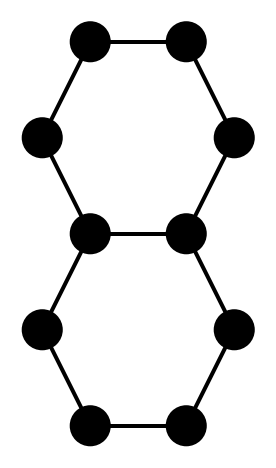
Double Honeycomb structure

Letter Envelope structure

Triple Honeycomb structure

Some structures will not work. You may need to add or remove lines to ensure they comply with the rules.


Game 2: The Shape-Shifter

Very often, a drawing has more than one way to follow the rules. Can you find all the possibilities ?

  • Redraw the exact same dots right next to your drawing on your page.

  • Can you place all the lines so that at least one line has a different thickness compared to the other drawing(s) ?

  • Keep redrawing until you cannot find any new ways!

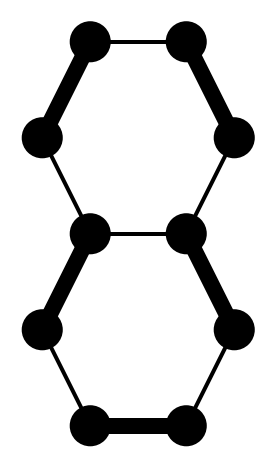
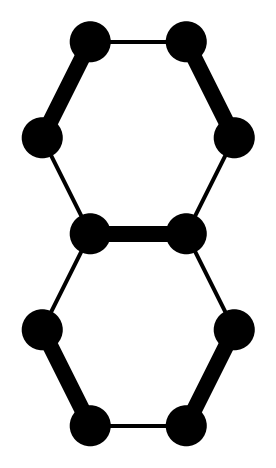
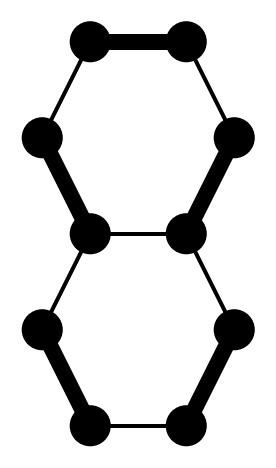
Example: The Double Honeycomb structure has 3 different winning drawings.

Code
all_resonances = mol1.resonance()

for i, res_mol in enumerate(all_resonances):
    res_mol.draw() 


Game 3: The Mystery Box

  • Now, imagine that you have a mysterious box with buttons and lights on its surface.

  • Some of the switches and lights are connected to the lines of your drawings.

  • Look at your first drawing. Decide which lines are buttons and which are lights. Not all lines need to be connected.

  • Now, place your drawings into the box. The mysterious box combines all your drawings into one!


Game 4: How the Mystery Box Answers

  • A switch controls the thickness of a line. (for example: ‘OFF’ means ‘thin line’. ‘ON’ means ‘thick line’).

  • A light shows the thickness of a line. (for example: ‘thin line’ means ‘light OFF’. ‘thick line’ means ‘light ON’).

  • Choose how you want to set your switches. (for example: Top line is thick, bottom line is thin).

  • Identify all the drawings that match your pattern. If you can’t find any, you get no answer, try a different pattern.

  • If you find one matching drawing, look at the lines connected to the lights: that is the Box’s answer!

  • If you find more than one matching drawing: close your eyes and select randomly ONE of the matching drawings.


Game 5: What is the Mystery Box For?

  • Try every combination (for example: thin/thin, thin/thick, thick/thin, thick/thick). Note down the results.

  • The lines can stand for anything you want: a thick line on the left could mean: “Is it raining outside?”. A thick line on the right could answer: “Take an umbrella!”.

  • What could the box be used for ? Find something useful.


Game 6: Reverse Mystery !

  • What if you change the buttons into lights, and the lights into buttons?

  • Surprise ! The box also works in reverse !

  • You can run forward, ask a question to find an answer, or run backward, start with an answer to reveal a question that created it!


The Mystery Revealed: You Just Built a Quantum Computer

Now, it is time to reveal what you were actually doing with your pencil:

You were not just doodling on paper. You were simulating a Quantum Molecular Computer:

  1. The Dots are Carbon atoms.
  2. The thin and thick lines are single and double chemical bonds (\(\sigma\) and \(\pi\) bonds).
  3. The multiple drawings on your page are quantum superpositions of molecular resonance states.
  4. Landing your finger on one drawing with your eyes closed is a quantum measurement!
  5. Running the drawings backwards is reversible quantum computation!

With a little hands-on experimentation, you will quickly develop a solid intuitive grasp of how the mechanics work.

Quantum molecular computing may seem daunting at first glance, but at its core, it is governed by simple, deterministic rules—much like the constraints of a board game. You no longer have an excuse to claim that quantum mechanics is inherently too complicated or counterintuitive to comprehend!

However, it must be acknowledged that truly mastering the game remains a genuine challenge.

Two fundamental questions remain:

  • How do we build specific structures to achieve a desired computational outcome?
    and
  • What is the true computational power of quantum molecular systems?

👉 You are now ready to dive into the theory :
“A Refresher on Boolean Logic”